
Content
A complete mobile door box contains the following.
- Junction box
- Door control card 150-010
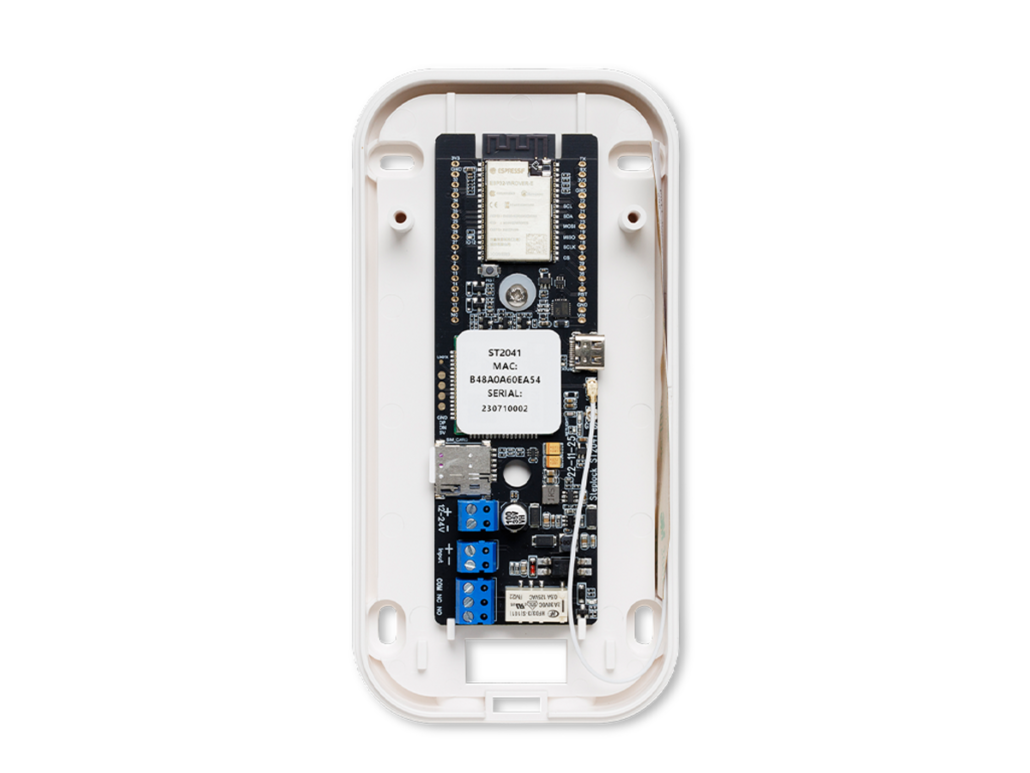
Installation
To install a mobile door box, you need to have access to 12-24V DC in the door environment or where the card is to be mounted.
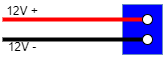
Start by loosening the upper two-pole terminal block which is voltage supply and connect + on the upper screw,
Next, connect - to the lower of the two screws. Wait to connect the terminal block until all connection has been made.tförd.
Depending on what is to be controlled, connect the control to the 3 pin connector at the bottom as shown in the example below.
Electrical locks
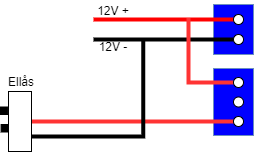
Gate control or open button external system
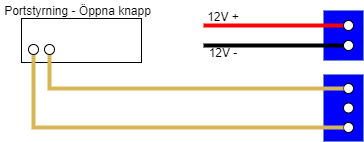
Open button
The 2-pin connector labeled Input +/- can be used as an open button to activate the relay. This is done by shorting the terminals with a pulse switch according to the instructions in the drawing below..
PS: the input should NOT be energized even if the marking on the circuit board shows +/-
Deployment
After we have finished connecting, we can connect the live terminal block to the board again.
When the device starts up, the status led lights up and within 30-40 seconds the netlight should also start flashing.
The start-up takes 30-120 seconds the first time when the registration of the device must be done against Telia's network to establish a connection.
Once the device is started, it is time to add the device to the system.
- Go to https://www.steplock.cloud/
- Log in to your user
- Select customer
- Navigate to Devices
- Click add device.
Enter the name of the door environment and enter the MAC address that is listed on the device as shown below.

Click Save.
You will now be taken back to the device page. Here you should now see the device's connection time, reception.
If the device has connected as above so that there is a connection time and reported reception, the setup is complete and you can start assigning permissions.